
Whispering to Your ESP32: Building an Offline Voice Assistant with Edge Impulse
Create a hands-free, cloud-free command system using ESP32, a MEMS mic, and TinyML on the edge

Introduction
Voice control is no longer just the domain of Alexa or Google Assistant — with modern microcontrollers and TinyML tools, you can build your very own offline voice assistant. In this project, we’ll explore how to set up a fully self-contained voice recognition system using an ESP32, an INMP441 MEMS microphone, and Edge Impulse. The result? A private, low-latency, and customizable voice interface that doesn’t rely on the cloud.
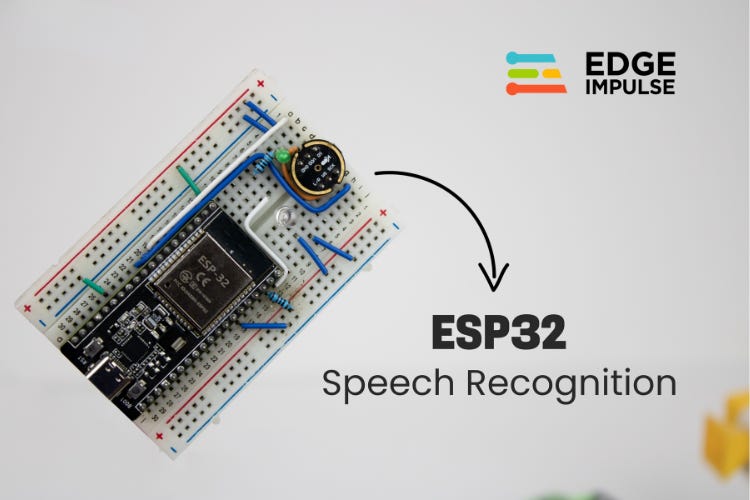
Why Offline Voice Recognition Matters
Many voice-assistant projects depend on cloud APIs: you speak, audio goes to the cloud, gets processed, and a response is sent back. While that’s powerful, it has downsides:
Privacy Risks: Your voice data is sent to remote servers.
Internet Dependency: Without connectivity, the assistant fails.
Latency: There’s a delay for round-trips.
Recurring Costs: API usage often costs money.
By contrast, offline voice recognition — where all processing happens on the device — solves these issues. Using Edge Impulse, you can train a lightweight ML model to run directly on the ESP32, enabling on-device wake-word detection and command recognition without sending your data anywhere.
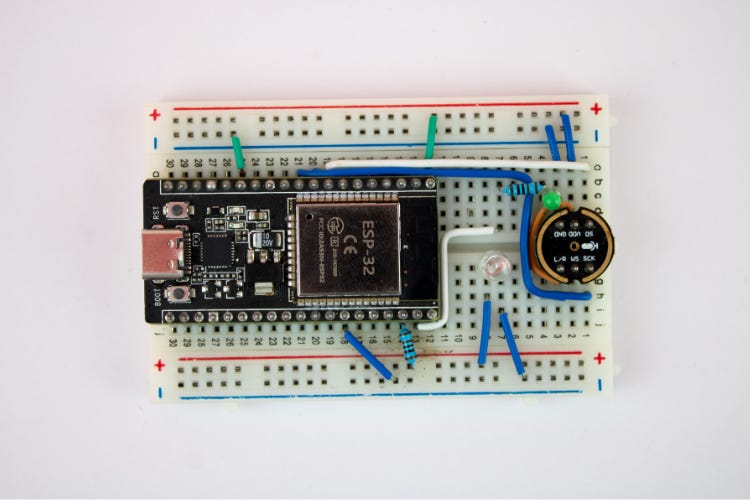
How the Project Works
Here’s a high-level overview of the workflow:
Collect Data: Record audio clips (e.g., wake word “marvin”, commands “on” and “off”, and background noise).
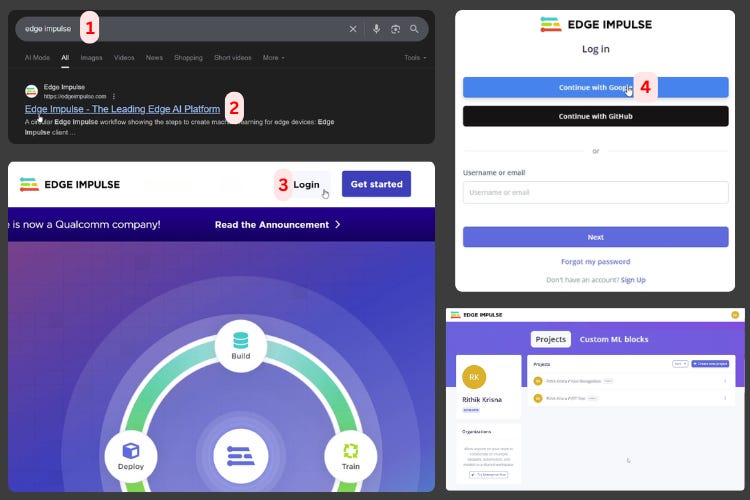
Train in Edge Impulse: Upload and label your data, design a signal processing + learning pipeline (“impulse”), generate features, and train a neural network.
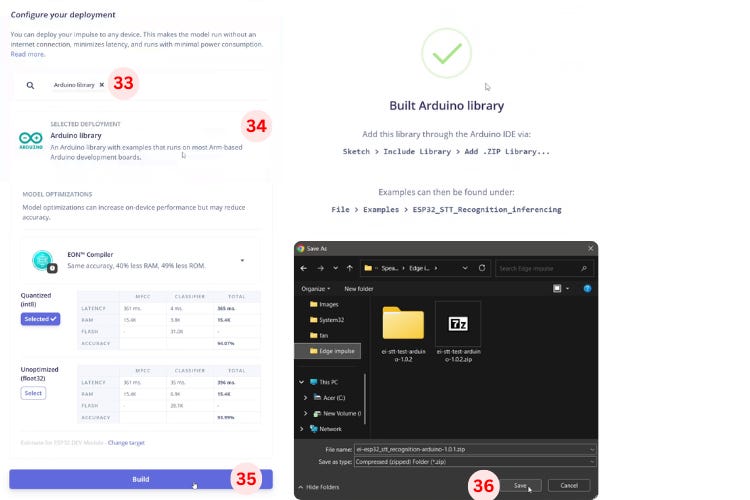
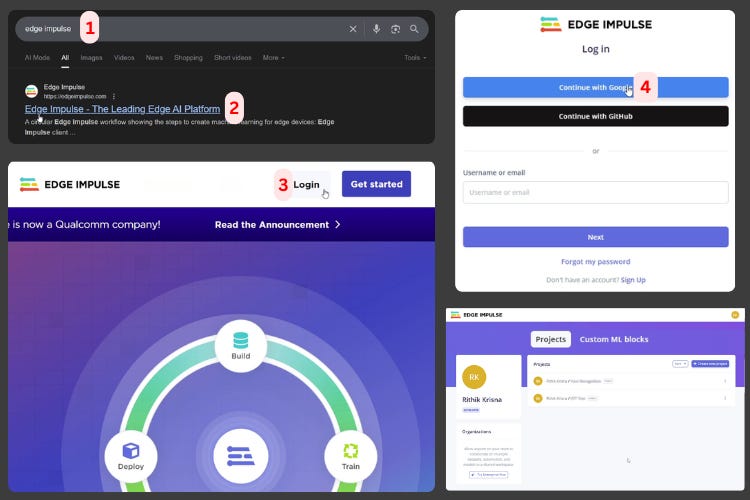
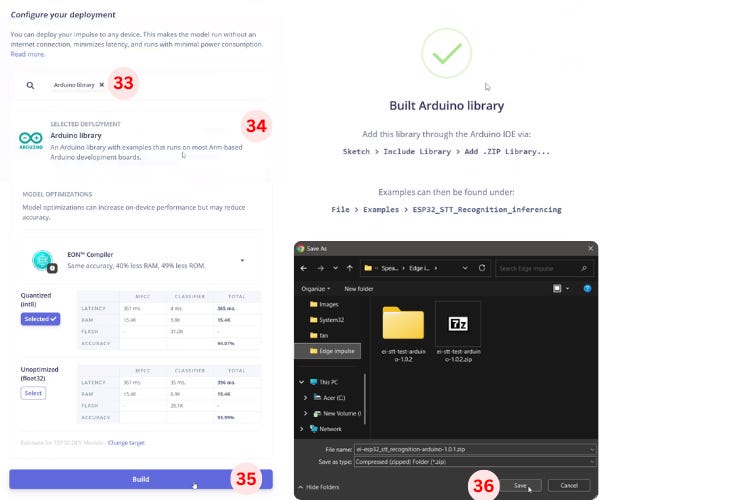
Deploy Model: Export the trained model as an Arduino library from Edge Impulse.
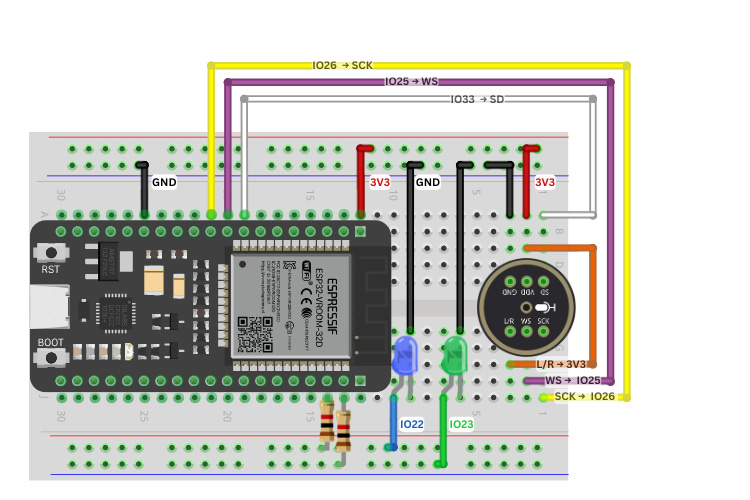
Hardware Setup: Connect an INMP441 mic to ESP32 via I²S, attach LEDs for feedback.
Write/Modify Code: Use the example sketch from Edge Impulse and tweak it to implement wake-word logic, confidence thresholds, and LED feedback.
Test & Refine: Upload to the ESP32, speak commands, observe LED patterns, and fine-tune thresholds for reliability.
Key Components and Features
ESP32 Development Board – Serves as the brain, runs the TinyML inference.
INMP441 MEMS Microphone – Digital I²S mic that captures high-quality audio.
Edge Impulse Platform – For data labelling, training, and exporting a deployable model.
LED Feedback System – Two LEDs: one for wake-word detection, another for command feedback.
Dual Confidence Thresholds – One threshold to detect the wake word, another to confirm commands (e.g., “on” or “off”).
10-Second Listening Window – After detecting the wake word, the system listens for a command for a fixed duration.
Code Overview
The code structure of the project works like this:
Initialisation: Start I²S, allocate buffer, set up LEDs, and serial monitor.
Audio Capture + Inference Loop:
Continually read samples from the mic.
Run inference using the Edge Impulse classifier.
Based on the results, check if the wake word is detected.
If wake word is detected, start the “listening mode” (LED pattern) and wait for commands.
Classify commands based on confidence thresholds: e.g., > 0.80 for executing, > 0.50 for recognition feedback.
Feedback Functions: Control LED patterns:
Quick double flash for wake word.
Continuous light during listening.
Distinct patterns for “on” (e.g., triple flash) or “off” (fade effect).
Cleanup / State Reset: After the listening window ends, the system goes back to standby.
Testing & Results
Once you upload the code to the ESP32:
Saying “Marvin” (the wake word) triggers the indicator LED to blink twice, confirming the wake word.
After “Marvin”, you have about 10 seconds to issue a command like “on” or “off”.
If the command is recognised with sufficient confidence (> 80%, for example), the control LED changes state accordingly — on or off.
All of this works completely offline — no cloud API calls.
Challenges & Tips
Dataset Quality: The performance heavily depends on how you train your model. Use diverse samples for wake words and commands (different voices, background noises).
Threshold Tuning: The default confidence thresholds might not work well in noisy environments. Experiment with them.
Latency vs Accuracy: Larger models give better accuracy but increase inference time. Balance based on your hardware.
Power Consumption: Continuous listening uses more power. If you’re using battery power, consider using deep sleep or wake-word-only listening between intervals.
Scalability: You can expand the model to recognise more commands — just train more classes on Edge Impulse and redeploy.
Why This Project Is Powerful
Privacy-First: All recognition is on-device — no sensitive voice data goes to the cloud.
Edge Compute: You’re running TinyML on a microcontroller — a real-world example of edge AI.
Cost-Effective: ESP32 + INMP441 is a low-cost setup compared to smart speakers.
Customizable: You can define your own commands, wake words, and even feedback mechanisms.
Low Latency: Without network delay, responses can feel more immediate.
Applications & Future Possibilities
Here are a few ways you could build on this project:
Use different wake words or multiple command words.
Integrate with home automation — use voice commands to control lights, fans, or even relay modules.
Combine with text-to-speech — make the ESP32 respond via voice.
Use other models on Edge Impulse — for example, gesture detection, environmental sound classification, or language detection.
Optimise for lower power — use deep sleep between listening windows or hardware wake-word detection modules.
Conclusion
This ESP32 voice recognition is a fantastic way to explore TinyML, embedded voice control, and edge computing — all with inexpensive and accessible hardware. By using Edge Impulse and ESP32, you can build a fully offline, real-time voice recognition system that respects privacy, works anywhere, and is customizable for your needs.
Whether you’re a maker, hobbyist, or IoT enthusiast, this voice assistant framework can be a foundation for more advanced, voice-enabled projects.
Couldn't agree more. The privacy risks of cloud-based assistants are a huge problem. I often wish my smart speaker could just skip a track during my Pilates practise without sending my whole playlist to the cloud. This focus on local processing with TinyML is just brilliant.